Monday, April 01, 2019
Ubuntu 16 - VMWare Player 12 - GCC Not found
First solution
cd /usr/lib/vmware/modules/source
wget https://github.com/mkubecek/vmware-host-modules/archive/player-12.5.9.zip
unzip player-12.5.9.zip
cd vmware-host-modules-player-12.5.9/vmmon-only/
make
cd ../vmnet-only/
make
cd ..
mkdir /lib/modules/`uname -r`/misc
cp vmmon.o /lib/modules/`uname -r`/misc/vmmon.ko
cp vmnet.o /lib/modules/`uname -r`/misc/vmnet.ko
depmod -a /etc/init.d/vmware restart
Second solution
mkdir ~/vmmodules #create a temp folder and copy files.
cp /usr/lib/vmware/modules/source/vmnet.tar /usr/lib/vmware/modules/source/vmmon.tar ~/vmmodules/
# make the modules manually
tar -xvf vmmon.tar
cd vmmon-only
make
cd ..
sudo cp vmmon.o /lib/modules/`uname -r`/kernel/drivers/misc/vmmon.ko.gz
tar -xvf vmnet.tar
cd vmnet-only
make
cd ..
sudo cp vmnet.o /lib/modules/`uname -r`/kernel/drivers/misc/vmnet.ko.gz
#Then reload the modules and restart vmware service, vmplayer should works now.
sudo depmod -a
sudo systemctl restart vmware
Thrid solution
#install the right version of gcc
$sudo apt-get install g++-4.9
Trick
$sudo sed 's/gcc version 5.4.0/gcc version 6.4.0/' /proc/version > /tmp/version
$sudo mount --bind /tmp/version /proc/version
$sudo vmware-modconfig --console --install-all
$sudo umount /proc/version && rm /tmp/version
Final solution 2019
Update kernel from 4.4 to 4.11 works good[2] and download from [3].
References:
[1] https://unix.stackexchange.com/questions/310637/vmware-kernel-module-a-compatible-version-of-gcc-was-not-found
[2] Update kernel https://www.howtoforge.com/tutorial/how-to-upgrade-linux-kernel-in-ubuntu-1604-server/
[3] Ubuntu kernels https://kernel.ubuntu.com/~kernel-ppa/mainline/
[4] Update Ubuntu 18 kernel https://www.tecmint.com/upgrade-kernel-in-ubuntu/


Monday, March 25, 2019
Sunday, March 24, 2019
MultiSeat Architecture

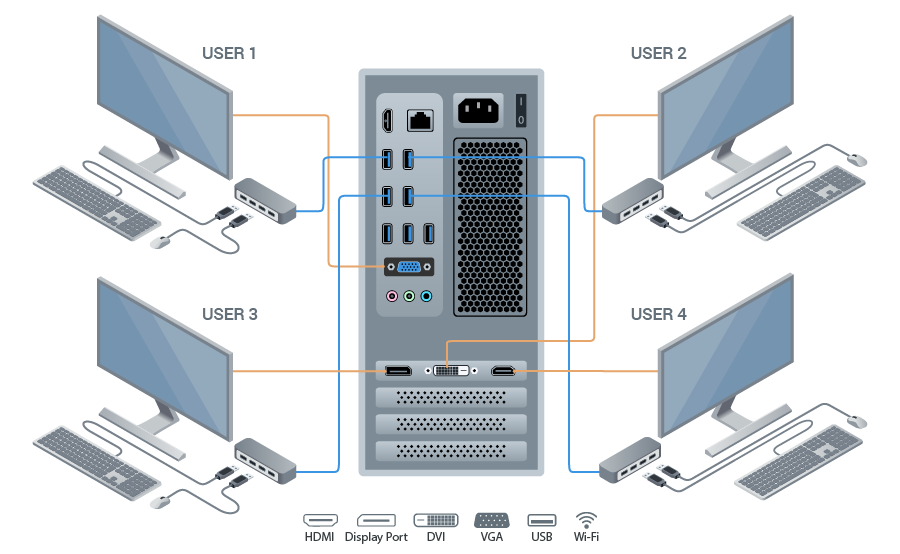
References:
[1] https://support.userful.com/Manuals/Userful_Desktop/HowTo/VideoCardToUSB
[2] Def https://en.wikipedia.org/wiki/Multiseat_configuration
[3] Software https://www.geckoandfly.com/23654/virtual-desktop-software-multiple-users/
[4] Remote Desktop https://www.tecmint.com/best-remote-linux-desktop-sharing-software/
Thursday, March 21, 2019
Cuda Installation resources
Cuda 10:
[1] last version https://developer.nvidia.com/cuda-downloads
Cuda 8:
#error -- unsupported GNU version! gcc versions later than 5 are not supported!
#error -- unsupported GNU version! gcc versions later than 5 are not supported!
$ sudo ln -s /usr/bin/gcc-4.9 /usr/local/cuda/bin/gcc
$ sudo ln -s /usr/bin/g++-4.9 /usr/local/cuda/bin/g++
nvcc warning : The 'compute_20', 'sm_20', and 'sm_21' architectures are deprecated, and may be removed in a future release (Use -Wno-deprecated-gpu-targets to suppress warning).
[1] https://developer.nvidia.com/cuda-80-ga2-download-archive
Fluid animation tools
Courses:
[1] bridson https://www.cs.ubc.ca/~rbridson/fluidsimulation/
Resources and Source Code:
[1] PBD http://www.interactive-graphics.de/index.php/research/108-a-survey-on-position-based-dynamics-2017
Wednesday, March 20, 2019
mySQL ODBC Driver error 5.2
Error 1918. Error installing ODBC driver MySQL ODBC
 5.3 ANSI Driver, ODBC error 13: The setup routines for
 the MySQL ODBC 5.3 ANSI Driver ODBC driver could
 not be loaded due to system error code 126: The
Solution:
MySQL Connector/ODBC requires Microsoft Visual C++ 2010 redistributable so you have to install it first.
Resources:
[1] MySQL Connector/ODBC 32-bit version, you have to download and install Microsoft Visual C++ 2010 Redistributable Package (x86).
[2] MySQL Connector/ODBC 64-bit version, you have to download and install Microsoft Visual C++ 2010 Redistributable Package (x64).
mySQL try to Optimize
References:
[1] https://dev.mysql.com/doc/refman/5.7/en/insert-optimization.html
[1] connection options https://dev.mysql.com/doc/connector-odbc/en/connector-odbc-configuration-connection-parameters.html#codbc-dsn-option-flags
[2] autocommit problem http://www.mysqlab.net/knowledge/kb/detail/topic/innodb/id/5934
[3] 101 tips https://www.monitis.com/blog/101-tips-to-mysql-tuning-and-optimization/
[4] Create table https://dev.mysql.com/doc/refman/8.0/en/create-table.html
Tuesday, March 19, 2019
Factura electronica - Perú
Padrón de RUC
[1] ~428MB http://www.sunat.gob.pe/descargaPRR/mrc137_padron_reducido.html
[2] Servicio online ruc.com.pe
Recursos:
[1] Tutorial facturación electrónica https://www.noticierocontable.com/facturador-sunat/
[2] http://clubdecontadores.com/conoce-cinco-mitos-uso-las-facturas-electronicas/
[3] Factura electronica http://revistas.pucp.edu.pe/index.php/revistalidera/article/viewFile/16873/17181
[4] http://cpe.sunat.gob.pe/factura-desde-los-sistemas-del-contribuyente
Software:
[1] http://orientacion.sunat.gob.pe/index.php/empresas-menu/comprobantes-de-pago-empresas/comprobantes-de-pago-electronicos-empresas/facturador-sunat/6785-03-requisitos-para-su-uso
Servicio online privados
[1] jperez https://sistema.susii.net/login
[2] admin https://demo.developer-technology.com/facturacion_electronica/login.php
Proveedores:
[1] PSE http://cpe.sunat.gob.pe/quien-es-el-proveedor-de-servicios-electronicos-pse
[2] Listao PSE http://orientacion.sunat.gob.pe/index.php/empresas-menu/comprobantes-de-pago-empresas/comprobantes-de-pago-electronicos-empresas/see-desde-los-sistemas-del-contribuyente/2-comprobantes-que-se-pueden-emitir-desde-see-sistemas-del-contribuyente/factura-electronica-desde-see-del-contribuyente/3550-padron-de-proveedores-de-servicios-electronicos-pse
[3] Homologación http://orientacion.sunat.gob.pe/images/cdp-electronicos/padron-pse/ManualHomologacinPSEagosto2016.pdf
PSE Precio https://www.nubefact.com/precios
[4] https://portal.efact.pe/soluciones/factura-electronica-plataforma-online.html
Sunday, March 17, 2019
Dynamic DNS
FQDN (Fully Qualified Domain Name)
- Pc name: "deb"
- Domain name: "bar.com"
Alternatives
[1] http://neorouter.com/products-nrfree
TensorFlow Example for learn
Subscribe to:
Comments (Atom)


 Posts
Posts

